
ServiceNow / GitHub Actions / Terraform / OKD
From a ServiceNow request to an OKD application
I built a self-service provisioning workflow that turns a ServiceNow catalog request into a reviewed GitHub change, an approved Terraform deployment, and an NGINX application on OKD. I implemented and tested two outbound authentication approaches: a PAT managed through ServiceNow connections and credentials, and a GitHub App backed by keystore signing. The PAT-based catalog flow successfully provisioned an application; its callback completion check remains unresolved. These lab screenshots and implementation notes explain the complete path.
OKD and Red Hat OpenShift
OKD is an open-source, community-supported Kubernetes distribution closely related to Red Hat OpenShift. Both share many platform capabilities, including Operators, integrated routing, monitoring, and cluster lifecycle management.
Red Hat OpenShift provides commercial support, certified integrations, and defined enterprise support lifecycles. OKD follows a community release and maintenance model while providing many of the same operational concepts and platform capabilities. This project runs on OKD.
Red Hat: OpenShift and OKD comparedExplore the workflow
Select a stage to inspect its responsibility and review boundary. Switch the authentication method or explore the proposed release-driven delivery path.
Stage 1 / 6
Request
ServiceNow captures supported catalog choices and the originating RITM identity. GitHub validates the submitted configuration before rendering infrastructure code.
Read this part of the walkthroughWhat problems does this solve?
This project demonstrates a foundation for a self-service delivery platform: a team requests a supported application, while configuration, infrastructure review, and deployment follow a defined process. The next step would connect that process to approved software releases instead of a fixed NGINX profile.
Fewer manual handoffs
A structured catalog captures the inputs needed for provisioning. Platform engineers review the generated change instead of manually rebuilding the same configuration for each request.
Repeatable environments
Reviewed Terraform profiles standardize application resources, DNS, and routing. Requests follow the same deployment path instead of relying on individual setup instructions.
Traceable release delivery
A release-aware extension would connect the requested version and image digest to the RITM, pull request, approved plan, and deployment result, making it easier to establish what was requested and what actually ran.
Proposed extension: from an approved release to a running environment
For example, a team could request application release 1.4.0 for a test environment. The workflow would resolve its approved container image from JFrog Artifactory, prepare the required infrastructure, and deploy that exact image to OKD after review and approval. Artifactory would supply the artifact; the workflow and OKD would perform the deployment.
- Select the application, approved release, target environment, and resource profile in the ServiceNow catalog.
- Validate the release against an allowed catalog and resolve its Artifactory image reference to an immutable digest, rather than relying on a mutable latest tag.
- Generate a pull request containing the desired configuration and pinned image reference. Review the change, then generate fresh Terraform plans for deployment approval.
- Apply the reviewed infrastructure and workload configuration. OKD pulls the selected image from Artifactory using appropriately scoped private-registry credentials.
- Verify rollout readiness, application health, and the deployed image identity before reporting a successful release deployment.
- Return the release version, image digest, application endpoint, and deployment outcome to the original ServiceNow item once the callback integration has been completed.
Implemented today: request-driven provisioning of the supported NGINX profile with review and deployment approval. Artifactory integration, release selection and validation, and release-aware reporting are proposed extensions. The existing ServiceNow completion callback still needs its own repair and verification.
1. A bounded self-service catalog
The OKD Resource Request catalog item collects a resource category, service type, application name, approved image profile, replica count, resource profile, exposure method, and derived hostname. The implemented web path supports NGINX, one or two replicas, the Small profile, and an HTTPS Route. Other service choices shown in the catalog are not evidence that every resource type is implemented.
UI policies show the relevant fields and client scripts calculate the hostname. The GitHub App server script repeats validation and recomputes the hostname. In both authentication paths, GitHub validates supported choices and the hostname convention before rendering Terraform. Client-side checks are not the security boundary.
- Stored choice values are the API contract: the “2 replicas” label must submit 2.
- The deployed Small profile requests 50m CPU and 64 MiB memory per pod, with limits of 250m CPU and 128 MiB. The screenshot’s 256 MiB label needs correction.
- After the original catalog item was deleted, a configured copy became active. Its Flow association, variable mappings, and catalog sys_id had to be checked again.
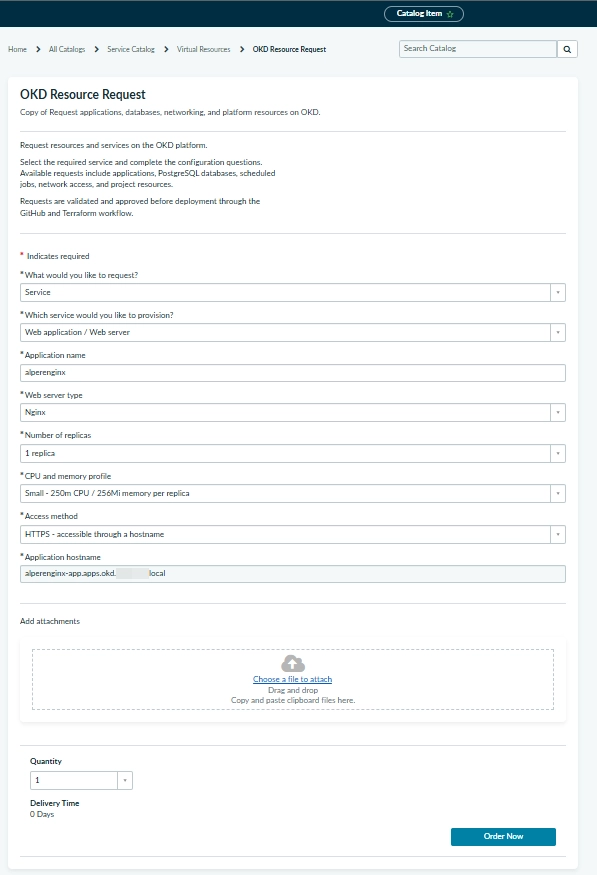
ServiceNow catalog form with approved NGINX, replica, resource, and HTTPS route choices. The displayed memory label differs from the deployed profile.
Open full-size image2. Keep the request identities distinct
A REQ is the parent order; its RITM is the individual Requested Item being provisioned. The RITM number is retained as request_id, while ritm_sys_id addresses the exact record through the Table API. The catalog item has another sys_id, used to scope access to the intended catalog definition.
- The Flow “OKD - Request NGINX PR” uses a Service Catalog trigger and dispatches only the supported service/web combination.
- Both paths receive eight catalog variables plus request_id and ritm_sys_id. The PAT path maps them into JSON Builder fields; the App path maps them into Script inputs and maps status/message outputs back. Creating Action inputs alone does not populate either step.
- GitHub accepting the dispatch means queued, not deployed. The RITM stays open until later verification.
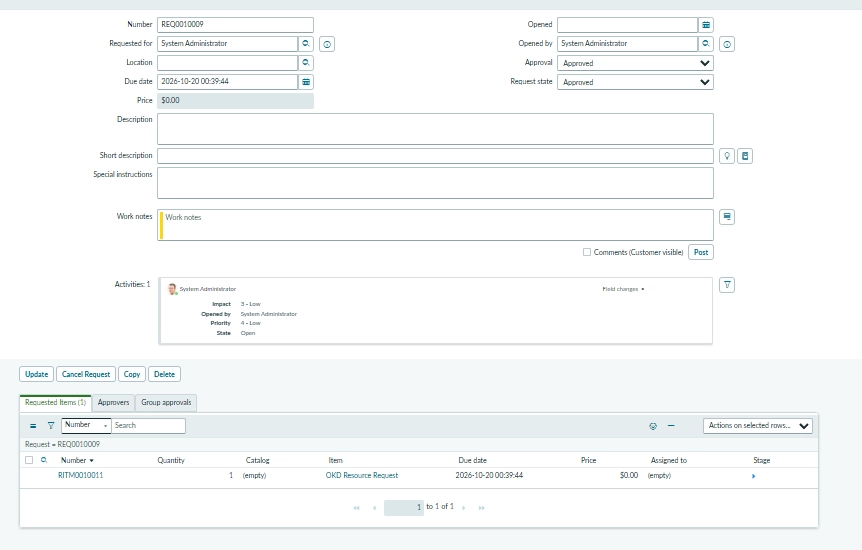
The parent REQ tracks the order and links to its individual Requested Item.
Open full-size image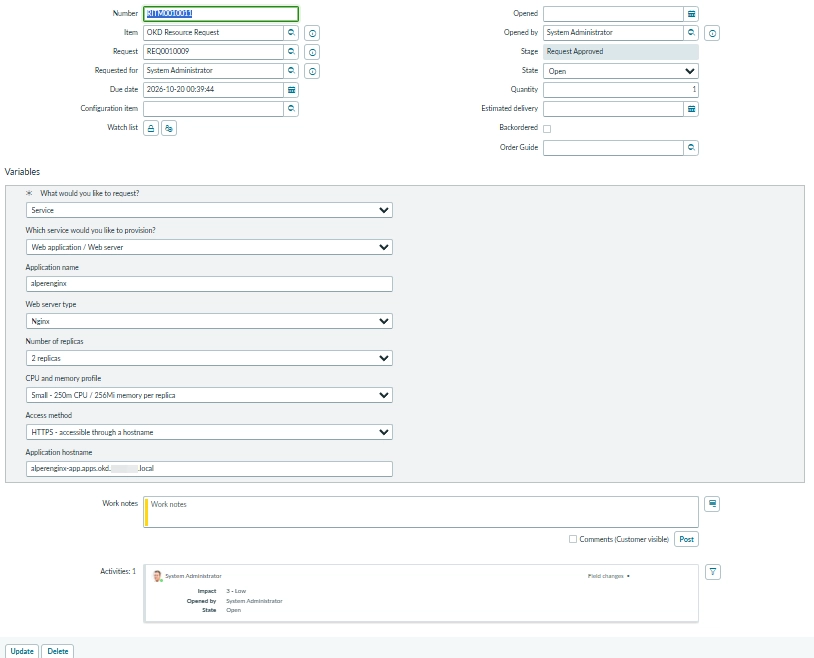
The RITM contains the submitted application variables, including the two-replica selection.
Open full-size image3. Choose one outbound authentication path
Both approaches dispatch catalog-request.yml on main with request_json encoded as a string inside the outer JSON body. The PAT path uses standard Integration Hub JSON Builder and alias-backed REST steps. The original GitHub App path uses the OKD GitHub Catalog outbound REST Message and its dispatch method from a server-side script. Only one path executes per catalog submission.
ServiceNow signs a JWT through a password-protected Java keystore, RSA 256 signing configuration, JWT Provider, and server-only Script Include. It exchanges the JWT for a short-lived installation token restricted to Actions write. The workflow obtains a separate installation token with Contents and Pull requests write for branch and PR creation.
- The keystore entry password belongs in the signing configuration’s key-password field, not the PEM or an identifier.
- The workflow reads the Client ID from vars.CATALOG_APP_CLIENT_ID and the complete PEM from secrets.CATALOG_APP_PRIVATE_KEY. A secret does not populate the vars context.
- The workflow’s client-id input and ServiceNow’s numeric App ID are different configuration values. No credential values are included in this page.
- For this lab, PAT was the configuration-based option; App authentication remains available when required by integration policy and maintained by a team with ServiceNow scripting expertise. This does not make Terraform, GitHub Actions, or the existing client validation code-free.
- The GitHub-side App still creates request branches and PRs when ServiceNow uses a PAT. Retain CATALOG_APP_CLIENT_ID and CATALOG_APP_PRIVATE_KEY in the repository configuration.
ServiceNow → GitHub App JWT → installation token → workflow_dispatch
GitHub workflow → separate installation token → request branch + PR
3.1. Configure the PAT connection and credential alias
The tested PAT is fine-grained, scoped to the actual repository resource owner, and needs Actions: Read and write for workflow dispatch. Administration, Contents, and Workflows write are not needed merely to call that endpoint. The token owner still needs access. A personal-owner token cannot access another owner’s private repository just because its owner can do so interactively.
The lab uses a Connection & Credential Alias of type Connection and Credential, connection type HTTP, and the API Key Demo Configuration template. It contains GitHub API - TEST and GitHub API - PROD connections to https://api.github.com, each with a separate expiring PAT credential. Initial tests used TEST active and PROD inactive; this later screenshot shows PROD active and TEST inactive. Support Multiple Active Connections is unchecked. The active record selects the connection; the TEST/PROD labels do not prove which application environment is targeted.
- Use the intended active connection for this single-default setup. Independent concurrent environments need explicit overrides or separate/child aliases rather than changing active records mid-run.
- Changing the alias template does not convert an old Basic Auth credential. Recreate the connection and credential through the intended API Key template when the attached type is wrong.
- The tested prefix configuration adds the Bearer separator. Store only the raw token in the masked API Key field and do not add a second Authorization header in the Action.
| API Key credential field | Lab configuration |
|---|---|
| Name | GitHub PAT - TEST (or a separate PROD credential) |
| API Key Header | Authorization |
| API Key Prefix | Bearer, without a trailing space |
| API Key | Raw PAT only; no Bearer prefix or surrounding spaces |
| Active | Checked |
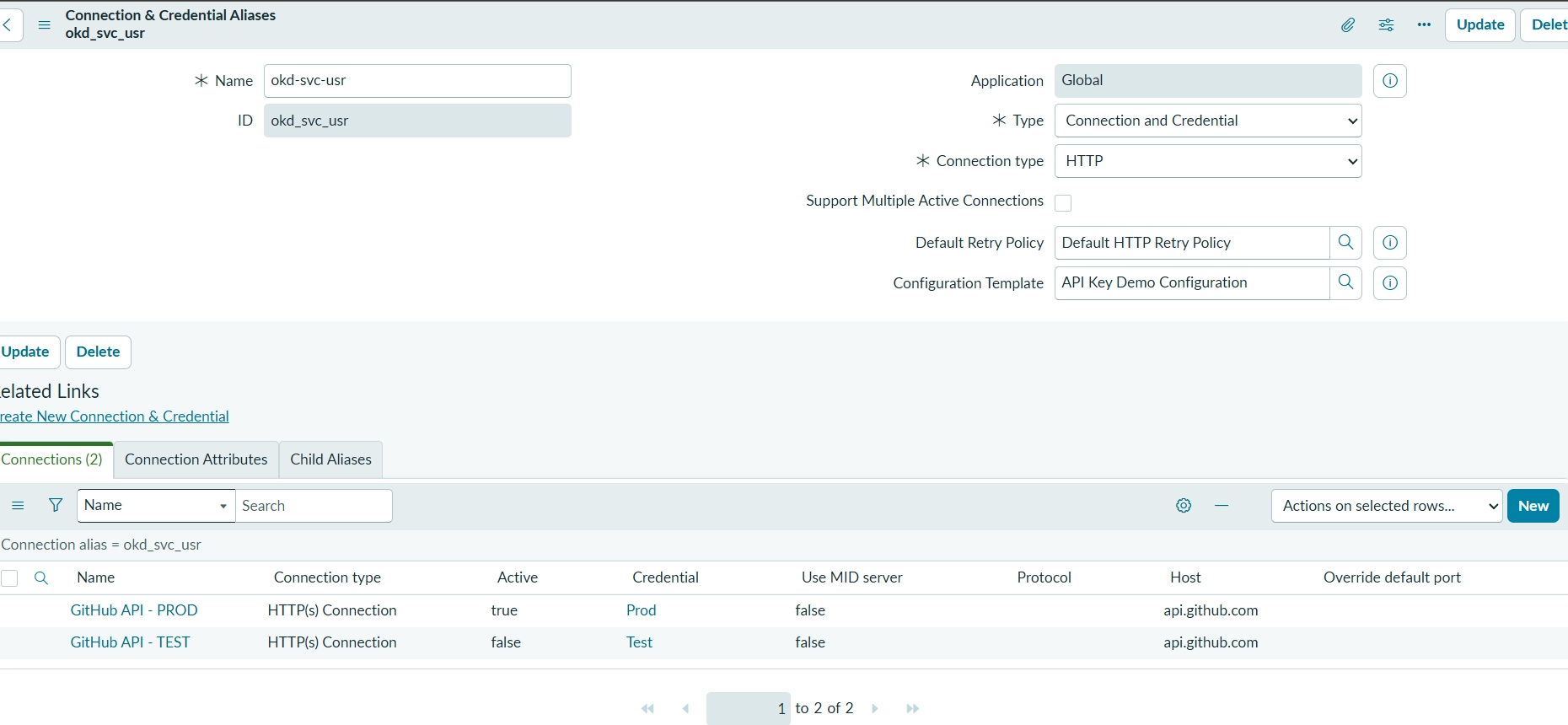
PAT integration: the HTTP Connection & Credential Alias uses the API Key template. This capture shows GitHub API - PROD active and TEST inactive; the active connection supplies the credential, not the environment name.
Open full-size image3.2. Build the nested dispatch payload with standard steps
Build OKD NGINX Request receives the ten String inputs. Its JSON Builder sets provision to Boolean true and maps each other field Value to the matching Action input. The String output request_json maps to JSON Builder → Output. Map the catalog Flow into the Action, and the Action into the builder: leaving the second layer empty produces empty strings despite populated Flow inputs.
Dispatch OKD GitHub Workflow receives that mandatory request_json String. Its first step builds the outer object with ref=main, inputs as an Object, and inputs.request_json as a String mapped to the Action input. Its REST step uses the connection alias, POST, and the workflow-dispatch resource path. Set Request Type to Text and map the entire body only to the outer builder Output.
- The inner request stays a JSON-encoded String. JSON Builder escapes it; do not concatenate unescaped pills or send only the inner catalog object.
- The lab activated ServiceNow IntegrationHub Action Step - JSON Builder (com.glide.hub.action_step.json_builder) and refreshed Workflow Studio. Its availability depends on entitlement/plugin configuration. The deprecated feature was Payload Builder’s JSON mode, not JSON itself.
- The REST step sets Accept: application/vnd.github+json, Content-Type: application/json, X-GitHub-Api-Version: 2026-03-10, and User-Agent: servicenow-okd-catalog. Credentials come from the alias.
{
  "ref": "main",
  "inputs": {
    "request_json": "<JSON Builder input pill, mapped as String>"
  }
}

POST /repos/OWNER/REPOSITORY/actions/workflows/catalog-request.yml/dispatches
3.3. Test and activate the PAT-based catalog flow
Test GitHub API Connection first checked GET /user for authentication, then GET /repos/OWNER/REPOSITORY for access to the private target. Inspect the actual REST HTTP status and error outputs: an Action-level Completed result can still conceal an HTTP failure under permissive error handling.
Publish both builder and dispatch Actions. In the Flow web branch, map RITM Number and Sys ID from Trigger → Requested Item Record and all eight catalog values from Get Catalog Variables. Pass the builder’s Request JSON into the dispatch input, save, and activate the Flow. Remove the old App dispatch from this active branch to avoid duplicate requests; keep the alternative implementation available.
- Catalog variable names: request_category, service_type, web_name, web_image_profile, web_replicas, web_resource_profile, web_exposure, web_hostname. The two record inputs are request_id and ritm_sys_id.
- Test the complete Action so JSON Builder runs before REST. Supply actual JSON contents of a genuine request, not its metadata filename. Require essential values to throw an error when empty.
- Check the resulting catalog-request run as well as dispatch acceptance. The PAT migration subsequently provisioned an OKD application successfully, but the separate notification/completion step still failed.
Get Catalog Variables
  → If category=service and service_type=web
    → Build OKD NGINX Request
    → Dispatch OKD GitHub Workflow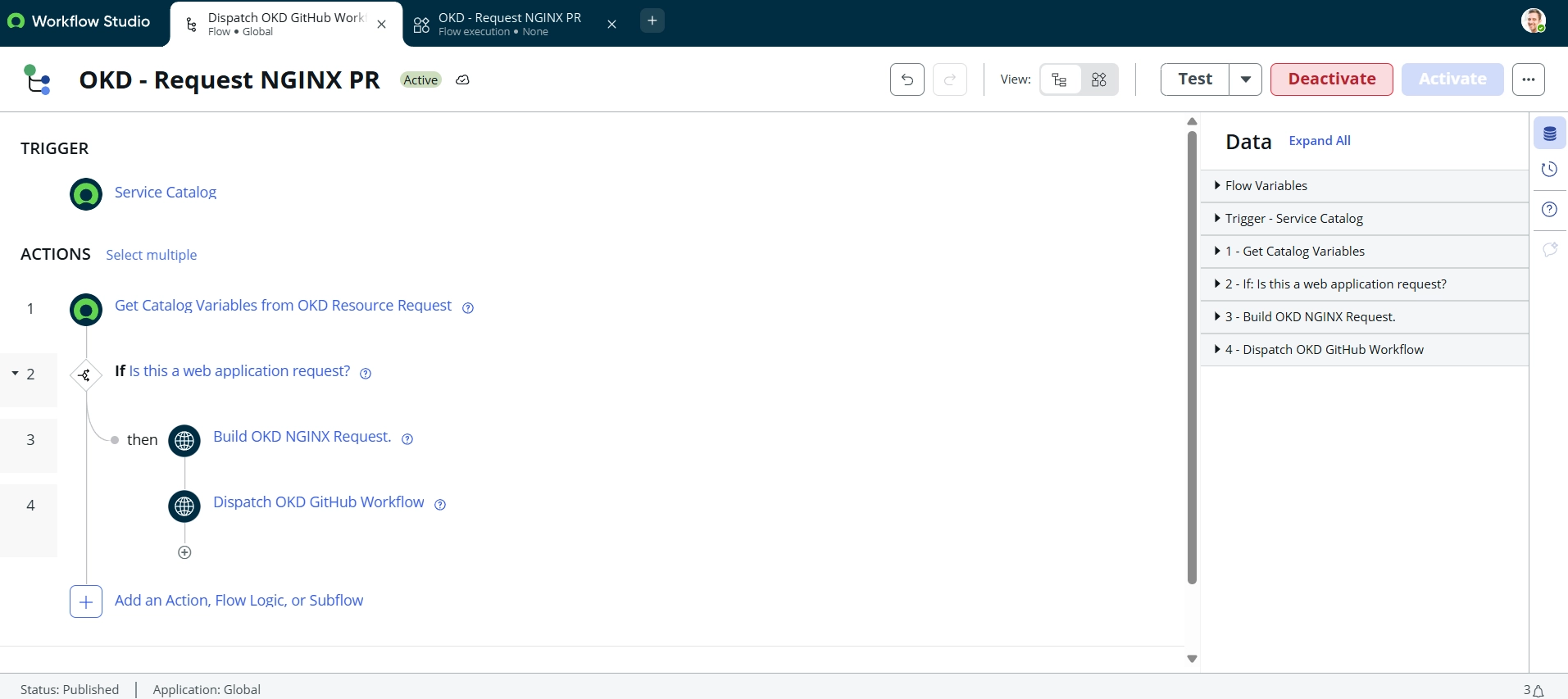
PAT integration: the active Service Catalog flow reads variables, checks the web request, builds the request JSON, and dispatches the GitHub workflow. These are the standard PAT-based Actions, not the GitHub App Script step.
Open full-size image4. Turn request data into a reviewed change
The workflow validates the payload and renders a fixed Terraform module call. The requester chooses supported settings rather than supplying Terraform code. Each request produces metadata under servicenow/requests and a corresponding Terraform file; both retain the RITM identity for the return path.
Provisioning PRs run offline checks and a live preview. The privileged preview takes trusted implementation code from main, validates the proposed request files as data, and reconstructs only those allowed files. It does not run arbitrary PR scripts or modules with infrastructure credentials.
- Validation rejects unsupported options, invalid or duplicate application names, conflicting identities, and unexpected generated content. Git writes do not force updates.
- A read-only ServiceNow preflight checks authentication, the exact RITM, and catalog ownership before live planning.
- A successful GET proves neither field write access nor permission to close the ticket. The shared Terraform root can include other already-merged requests, so the whole plan needs review.
servicenow/requests/RITM0012345.json
terraform/request-RITM0012345.tf
catalog/ritm<number>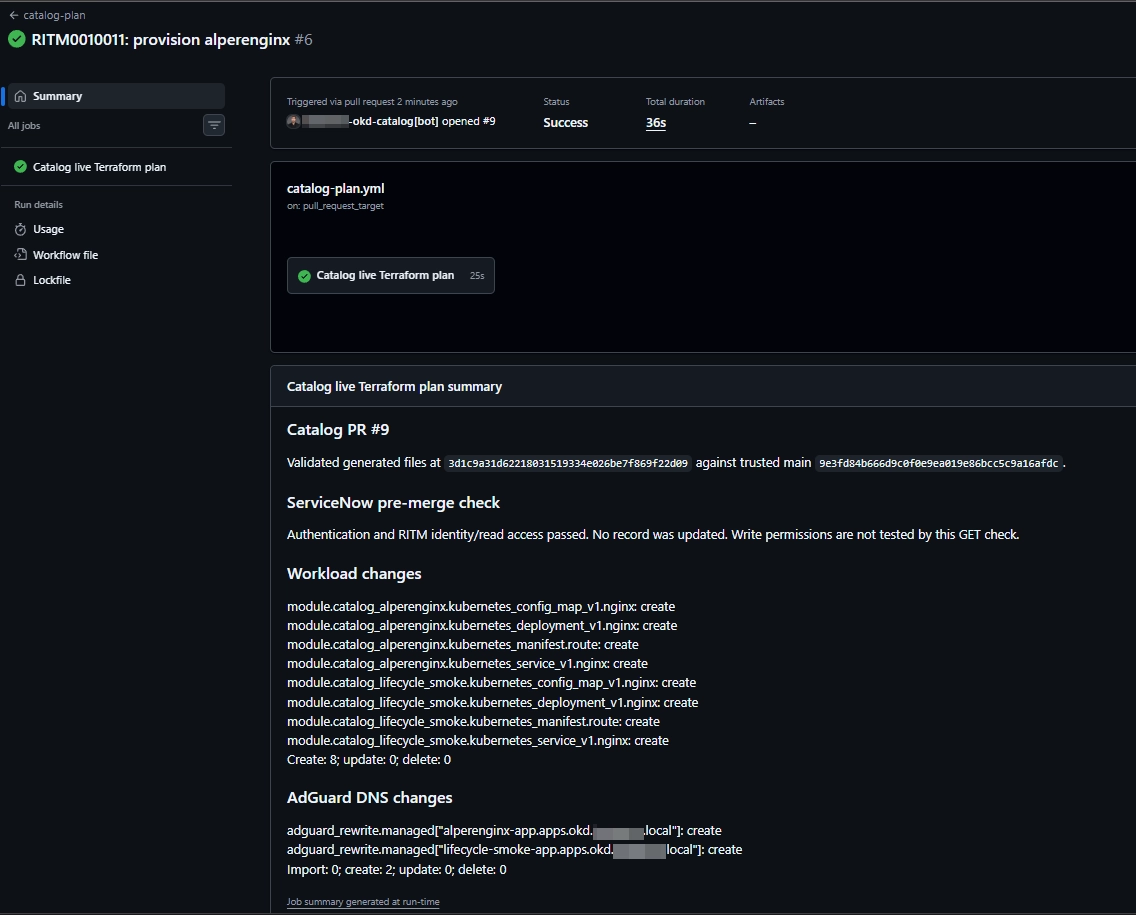
The live Terraform preview validates the generated change and performs a read-only ServiceNow identity check.
Open full-size image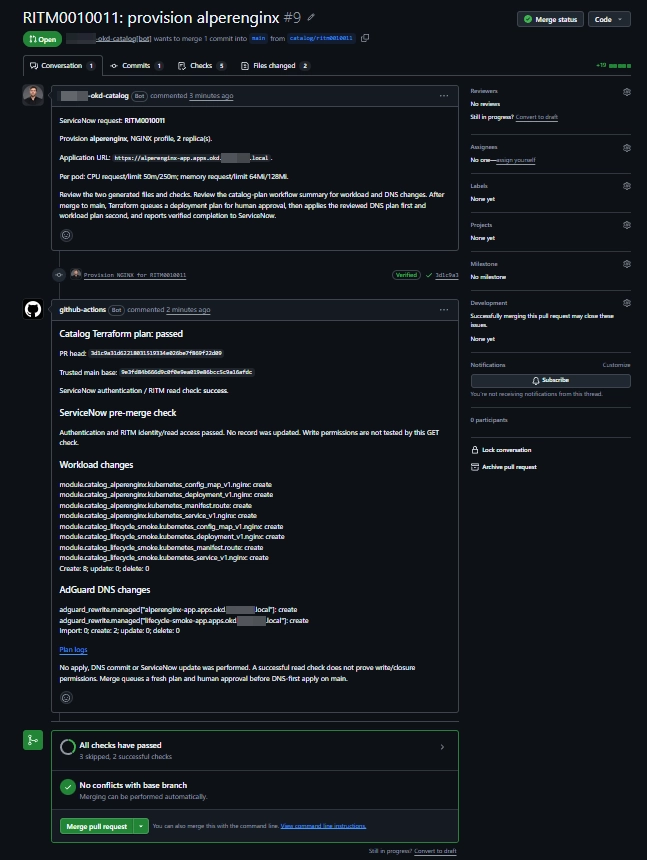
The generated pull request brings request metadata, workload changes, and DNS changes into review.
Open full-size image5. Fresh plans, a shared queue, and human approval
PR review approves the desired configuration. After merge, the workflow creates fresh DNS and workload plans against current state; the earlier PR preview is not reused for apply. Required environment reviewers were unavailable in this lab’s private GitHub Free setup, so deployment uses an issue-based approval gate.
The issue links the plans and identifies their saved bundle. Only an authorized human in DEPLOYMENT_APPROVERS with the required repository permission can submit the exact approval command. Rejection, closing the issue, or timeout stops apply. A digest identifies a bundle; it is not a password or encryption key.
- Saved plans may contain sensitive values. The bundle is encrypted and authenticated using TF_PLAN_ENCRYPTION_KEY; source, run, digest, and age checks bind review to the plans actually applied.
- The shared concurrency slot covers planning, the approval wait, and apply. Later deployments wait before planning; this is a deployment queue, not a merge queue or a promise of exact catalog-submission order.
- A shared-root plan can include several requests merged before planning. Requests merged after plan creation are not silently inserted; changes to shared code or existing configuration require fresh review.
/approve <plan-bundle-digest>

concurrency:
  group: okd-e2e-lab
  cancel-in-progress: false
  queue: max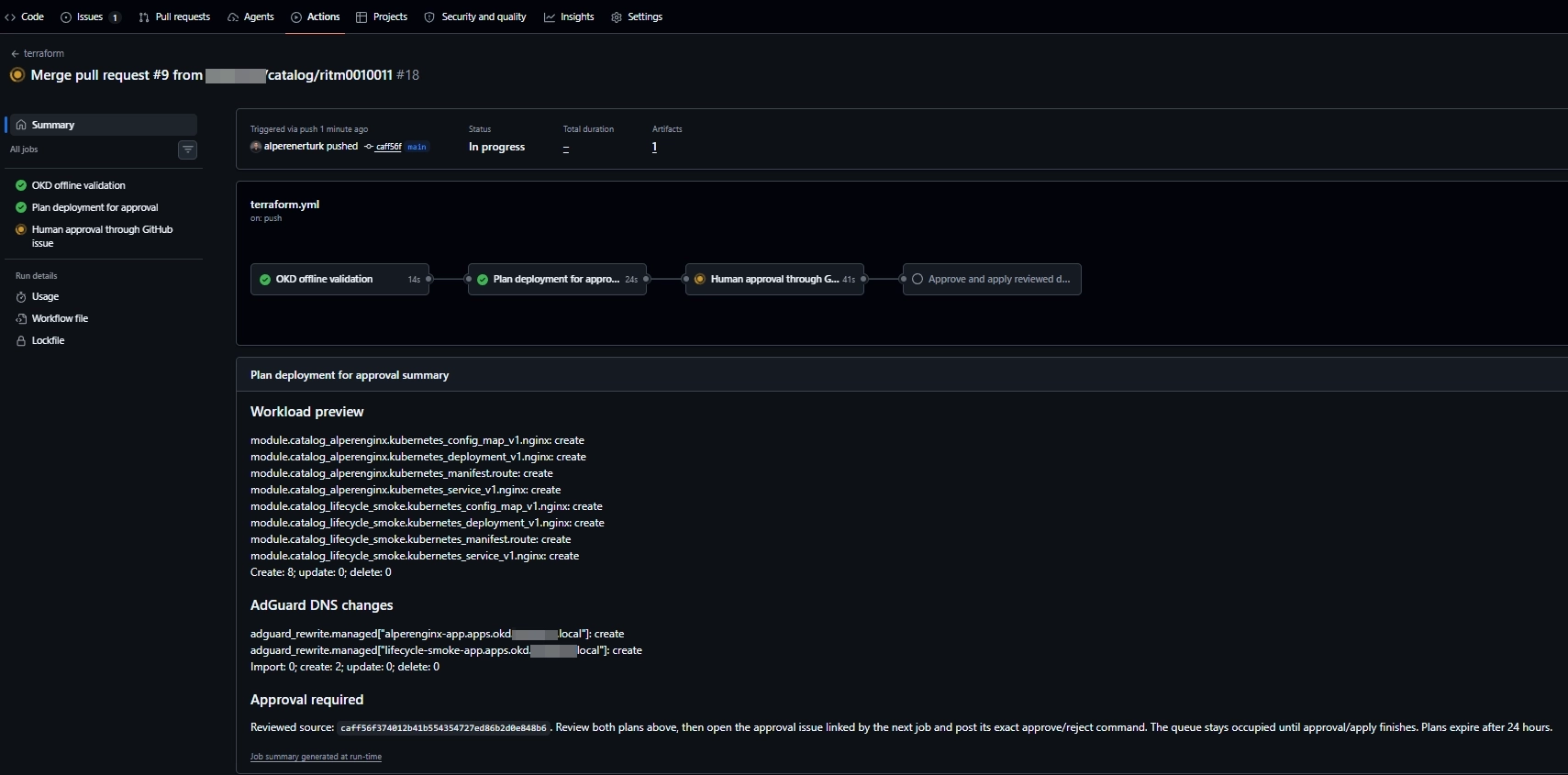
After merge, fresh plans are created and the deployment waits at its human approval gate.
Open full-size image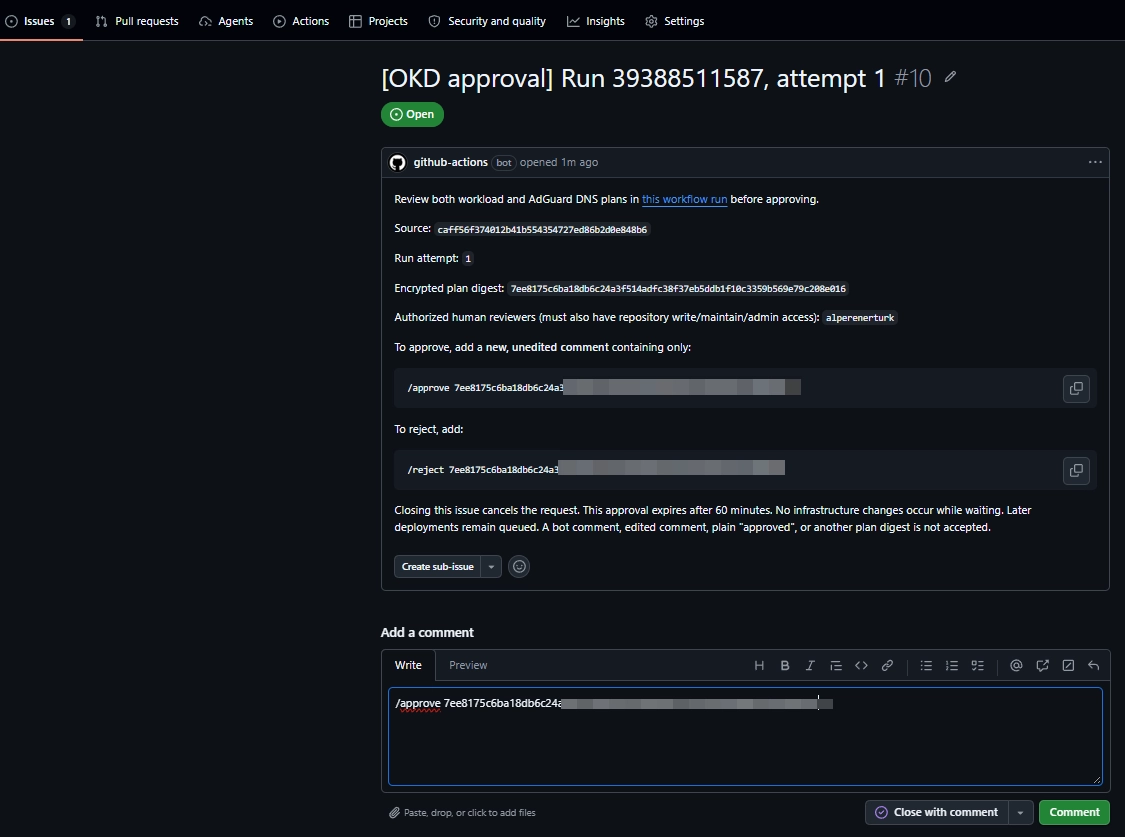
The approval issue binds the reviewer’s command to the encrypted saved-plan bundle digest.
Open full-size image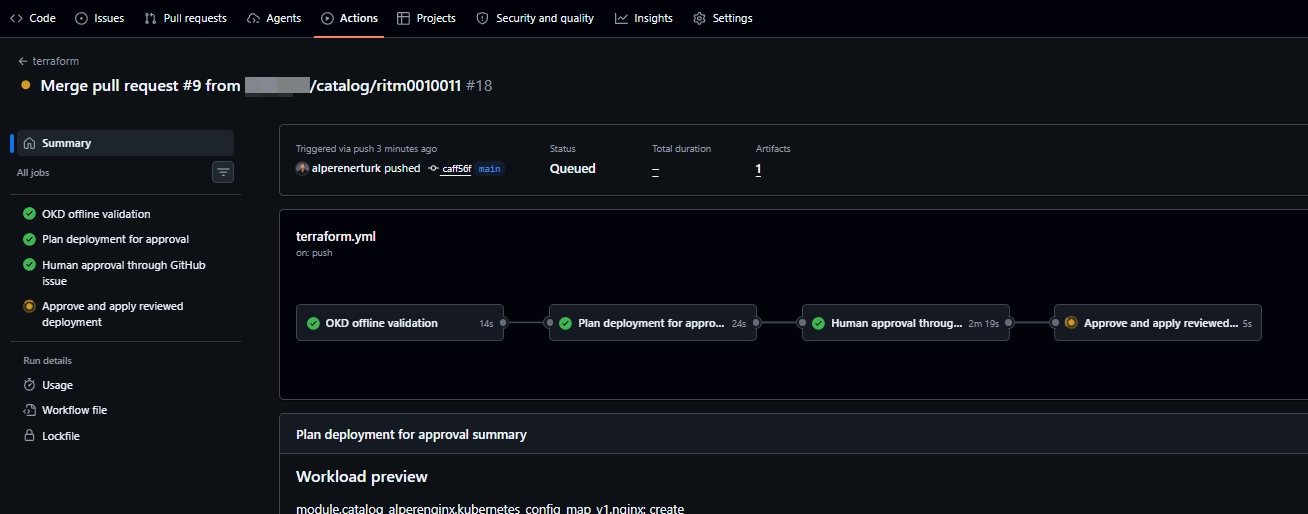
Human approval has passed and the reviewed apply job is queued. This screenshot alone does not prove deployment completion.
Open full-size image6. Apply DNS first, then deploy to OKD
Apply updates AdGuard DNS first and verifies the explicit records before applying the saved workload plan. Each web module creates an NGINX ConfigMap, Deployment, Service, and Route in catalog-lab. HTTPS exposure uses the existing OKD router, not a second ingress controller. NGINX runs unprivileged on port 8080.
- The screenshots show two requested replicas Running, 1/1 Ready, and with zero restarts.
- DNS and workloads have separate Terraform states. Ordered apply is not atomic: if workloads fail, DNS records can remain.
- Recovery should reconcile recorded state rather than blindly deleting resources.
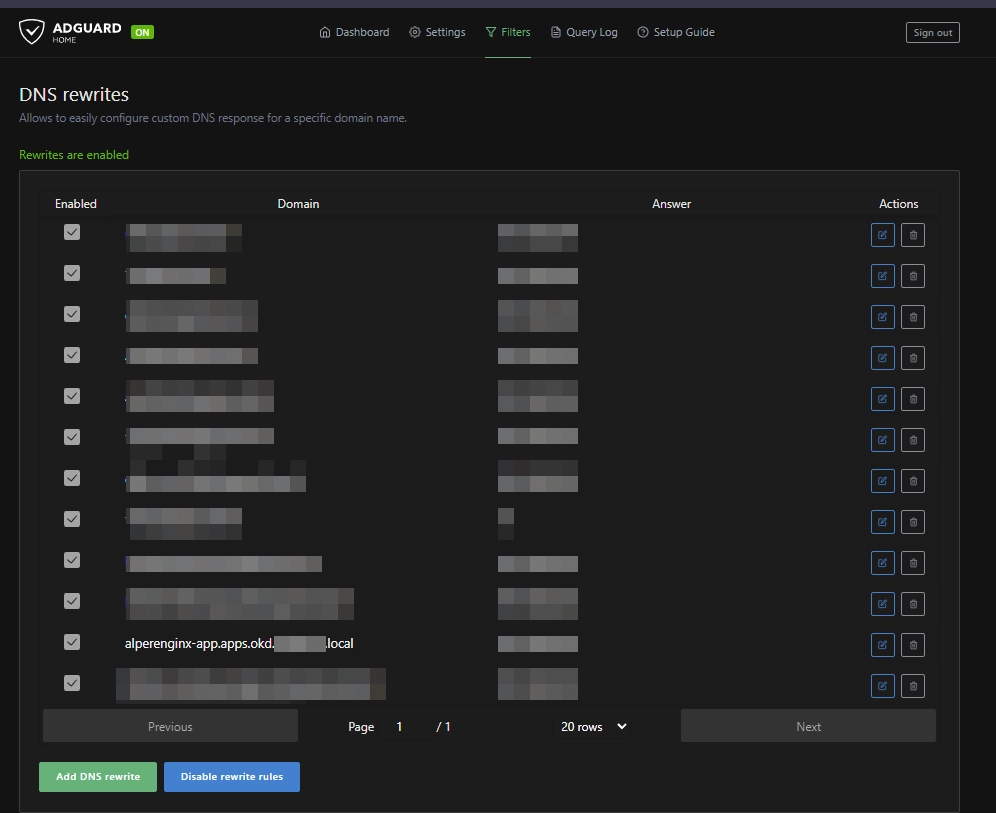
AdGuard DNS rewrites connect the application route to the lab’s ingress address.
Open full-size image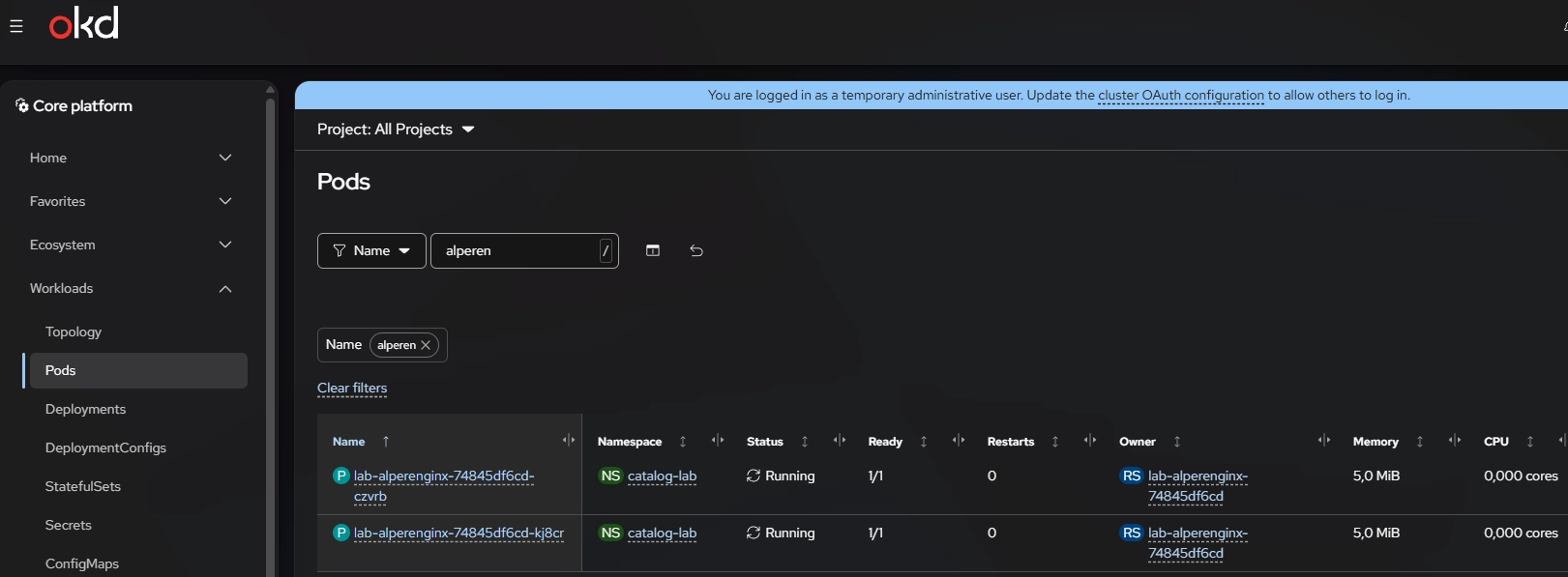
OKD shows both NGINX pods Running, each 1/1 Ready, with zero restarts.
Open full-size image7. Verify the application, not just the job status
The browser test returns a short NGINX response and the pod name. This demonstrates an HTTP response from the test application; pod readiness alone would not establish that a browser can resolve and reach the route.
Browser access requires lab connectivity, internal DNS resolution, and appropriate certificate trust. The supplied browser displays an untrusted-certificate indicator. The test endpoint has no application login; it is a lab verification endpoint, not a demonstration of production authentication.
- Readiness, DNS resolution, HTTP response, and certificate trust are separate checks.
- The response identifies the pod that served that request; a single response is not proof of traffic distribution across both replicas.
OKD Terraform NGINX test
Pod: <pod-name>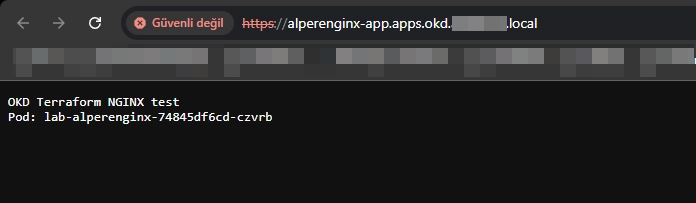
The browser receives the NGINX test response and serving pod name. The certificate is not trusted in this browser.
Open full-size image8. Return verified results to the originating RITM
Neither outbound PAT nor GitHub App authenticates the return call. The callback uses a separate ServiceNow integration account. Before updating the item, it checks RITM identity, catalog ownership, expected replica readiness, and an admitted Route. It writes a deployment note and the intended completion fields through the existing sc_req_item Table API; it does not directly close the parent REQ.
The custom role alone grants no access. Record read/write permissions must be scoped to the active catalog item, and field access must be reviewed alongside inherited Task rules. The administrator elevated their own session to security_admin to manage ACLs; the callback account did not receive that role.
- Read fields: sys_id, number, cat_item, state, stage, and active. Write fields: work_notes, state, stage, and active.
- Exact field rules can replace wildcard or inherited matches. Preserve existing grants when introducing catalog-specific callback permissions.
- SNOW_INSTANCE_URL and SNOW_CATALOG_ITEM_SYS_ID identify the target. Callback credentials, kubeconfig, backend access, DNS credentials, and the plan encryption key remain secrets, not public example values.
https://INSTANCE.service-now.com/api/now/table/sc_req_item/RITM_SYS_ID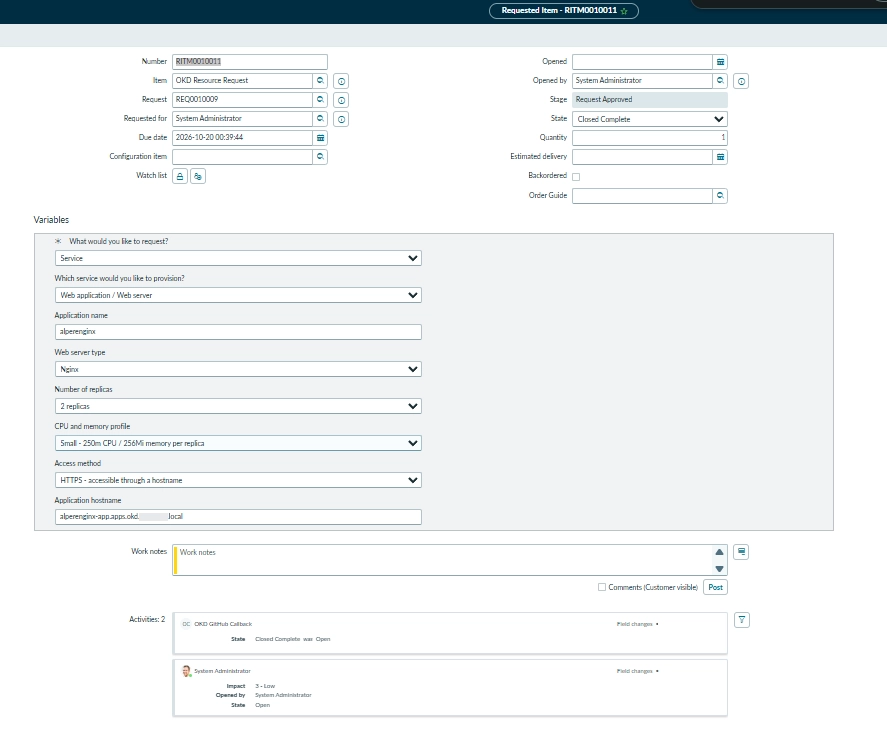
The callback changed State to Closed Complete while Stage still showed Request Approved, exposing partial completion.
Open full-size image9. Diagnose partial completion honestly
The most useful failure came after the application was already ready. ServiceNow retained state=3 and active=0, but stage=request_approved. State and Stage are distinct fields: Closed Complete state alone was not full synchronization.
The Stage dictionary entry was Strict Read Only. Display Read Only was proposed to keep the form read-only while permitting supported API updates subject to access controls. This dictionary setting affects all Requested Items, so it needs a scoped review. The walkthrough did not record a successful post-change API read-back.
The latest PAT-driven request successfully deployed, but its notification step still failed and the overall run can remain red. Investigation is deferred without disabling the completion check. The earlier state/stage values below belong to the inspected historical RITM, not necessarily the latest failed request. Its returned fields, effective access, dictionary settings, stored choice values, and Flow/business-rule overwrites need separate inspection.
- Local callback diagnostics were improved to identify mismatched or omitted completion fields and reject partially completed records as idempotent success.
- The updated local Python suite passed 123 tests. That is local evidence, not proof that the diagnostics were deployed or that the live Stage issue was repaired.
- A red workflow can mean deployment succeeded while reporting failed. Repairing the ticket should not require Terraform apply again. If infrastructure must be rerun, create fresh plans and obtain approval instead of replaying an old apply job.
Earlier inspected RITM, read back as administrator:
state=3
stage=request_approved
active=0
10. Clean up branches without confusing it with deployment
A separate workflow deletes matching same-repository request branches after their PR merges to main. It recognizes RITM-prefixed branches and the generated catalog/ritm<number> and catalog/decommission/ritm<number> forms.
Cleanup preserves default/base branches, skips a branch whose head changed after merge, and checks for another open PR. It uses the built-in GitHub token without checking out PR code.
- Branch cleanup is independent of deployment approval and success.
- Deleting a merged branch does not remove its desired configuration from main.